










Postbacks
Postbacks allow affiliates to receive real-time notifications via HTTP GET requests when key events occur — such as a new player registration, a first-time deposit (FTD), or subsequent deposits. You can configure postback URLs for each event type, and the system will automatically call your URL with the relevant data as query string parameters.
Setting Up Postbacks
To configure postbacks for an affiliate:
- Navigate to the specific Affiliate's page in the dashboard
- Scroll to the Postbacks section
- Click the Add a Postback button
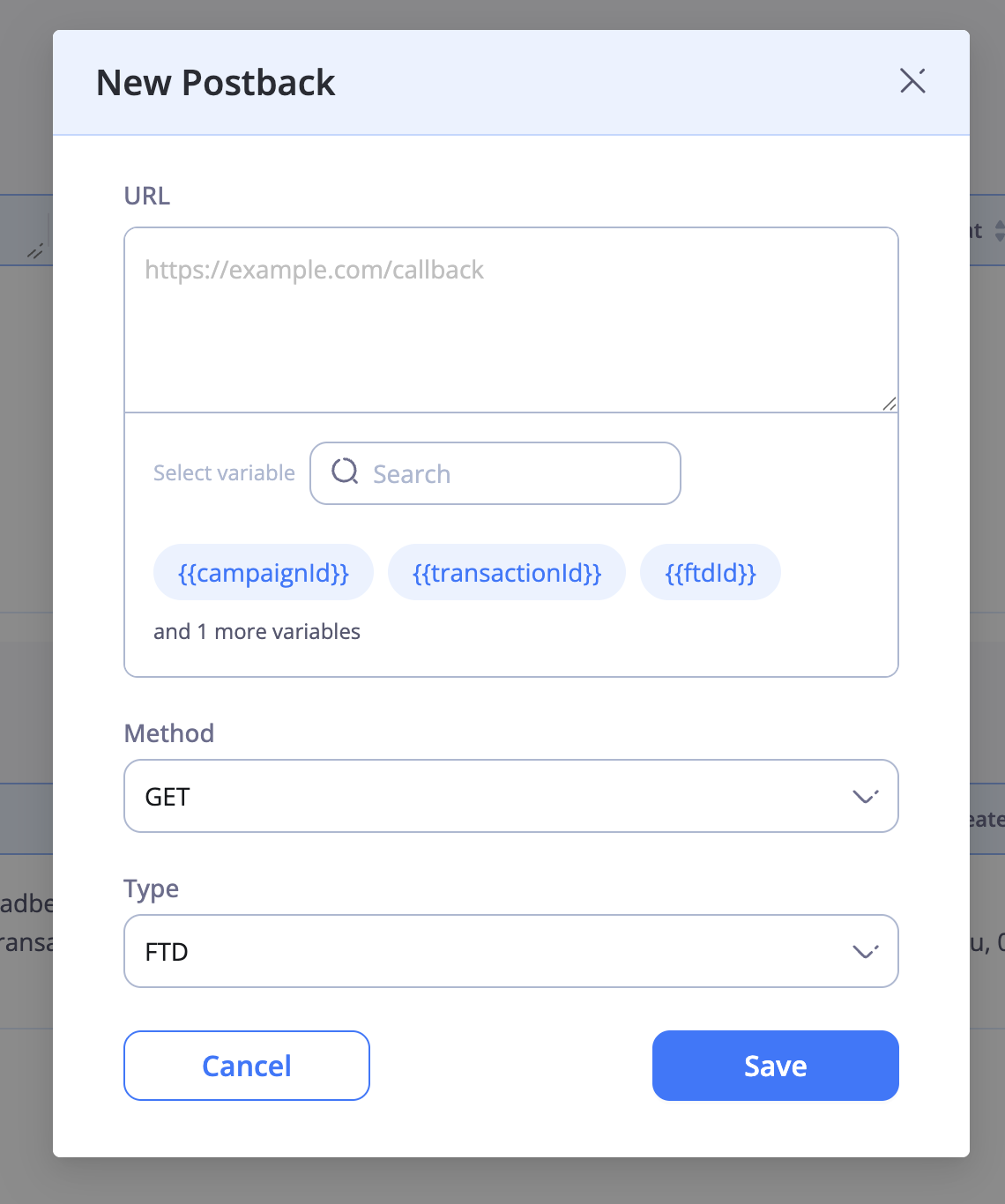
- Fill in the postback form:
- Type — select the event type (Registration, FTD, or Deposit)
- Method — HTTP method (GET)
- URL — your postback endpoint URL with the desired system and dynamic variables
- Click Save to activate the postback
Postback Types
| Type | Trigger |
|---|---|
| Registration | Fired when a new player registers through the affiliate's tracking link |
| FTD | Fired when the referred player makes their first successful deposit |
| Deposit | Fired on every subsequent deposit (2nd, 3rd, etc.) made by the referred player |
System Variables
System variables are automatically populated by the platform. Use them in your postback URL by wrapping them in double curly braces: {{variable_name}}
Registration Variables
| Variable | Description |
|---|---|
| {{click_id}} | Unique identifier for the click that led to the registration |
| {{link_id}} | The tracking link identifier used by the player |
| {{profile_id}} | The unique identifier of the newly registered player |
| {{aff_id}} | The affiliate's unique identifier |
| {{country_code}} | Two-letter country code of the player (e.g. US, GB, AU) |
| {{country}} | Full country name of the player |
| {{postback_id}} | Unique identifier for this postback call, useful for deduplication |
FTD and Deposit Variables
FTD and Deposit postbacks support all the Registration variables above, plus the following:
| Variable | Description |
|---|---|
| {{amount}} | The deposit amount |
| {{currency}} | The currency of the deposit (e.g. USD, EUR, GBP) |
| {{payment_id}} | Unique identifier for the payment transaction |
| {{postback_id}} | Unique identifier for this postback call, useful for deduplication |
?currency=&amount=1
Dynamic Variables
In addition to system variables, you can pass your own custom dynamic variables through the postback system. This is useful for tracking campaigns, sub-affiliates, or any other custom data you need to associate with a conversion.
Level 1 — Variables Set in the Tracking Link
When creating a tracking link, you can include custom query string parameters in the Destination URL field. These values will be captured and made available as variables in your postback URL.
Example
Tracking link destination:
https://site.com/?campaignId=campaign1Postback URL:
https://postback.com/?campaignId={{campaignId}}Result: When the postback fires, {{campaignId}} will be replaced with campaign1.
https://postback.com/?campaignId=campaign1Level 2 — Variables Passed at Click Time
You can also pass custom parameters dynamically when distributing your tracking link, without setting them in the link's destination. This gives you the flexibility to pass different values each time the link is shared.
Example
Tracking link destination:
https://site.com/Distributed tracking link (shared with your audience):
https://tracking.link/abc123?campaignId=campaign2Postback URL:
https://postback.com/?campaignId={{campaignId}}Result: When the postback fires, {{campaignId}} will be replaced with campaign2.
https://postback.com/?campaignId=campaign2Full Example
Here is an example of a fully configured Registration postback URL using both system and dynamic variables:
https://your-server.com/postback?click_id={{click_id}}&player={{profile_id}}&aff={{aff_id}}&country={{country_code}}&campaign={{campaignId}}&postback_id={{postback_id}}When a new player registers, the system will replace each variable and call your endpoint:
https://your-server.com/postback?click_id=abc-123&player=player_456&aff=aff_789&country=US&campaign=campaign1&postback_id=pb_001Here is an example of a fully configured FTD postback URL:
https://your-server.com/postback?click_id={{click_id}}&player={{profile_id}}&aff={{aff_id}}&amount={{amount}}¤cy={{currency}}&payment_id={{payment_id}}&postback_id={{postback_id}}Retries and Deduplication
Retries
If your server does not return a successful HTTP response, the system will automatically retry the postback up to 3 times, a couple of seconds apart. After all retries are exhausted, the postback will not be attempted again for that event.
Deduplication
To prevent processing the same postback more than once on your end, the system provides two deduplication mechanisms:
| Method | Description |
|---|---|
| Postback-ID header | Every postback request includes a Postback-ID HTTP header with a unique identifier. Your server can check this header to detect duplicate calls |
| {{postback_id}} variable | You can add {{postback_id}} to your postback URL as a query string parameter for easier access to the unique identifier without parsing headers |
| {{payment_id}} variable | For FTD and Deposit postbacks, you can add {{payment_id}} to your URL to deduplicate based on the unique payment transaction identifier |
Postback-ID header or the {{postback_id}} / {{payment_id}} query string parameters, as retries may result in your endpoint receiving the same postback more than once.